Every IT park is unique. One company might just need to track laptop serial numbers. Another might need to track the specific GPU model in a workstation, the battery health percentage of a tablet, or even the rack unit height of a data center switch.
Legacy tools often try to put you in a box. They give you a fixed set of fields and tell you to “just use the Notes section” for everything else. But you can’t filter, sort, or audit a “Notes” section effectively.
As we hit v0.10, we are giving the keys to the kingdom back to you. We are introducing Custom Fields: the feature that lets you define exactly what data matters to your business.
No More “Square Peg in a Round Hole”
With Custom Fields, you are no longer limited by what we thought you might need. You can create a data structure that perfectly matches your physical reality.
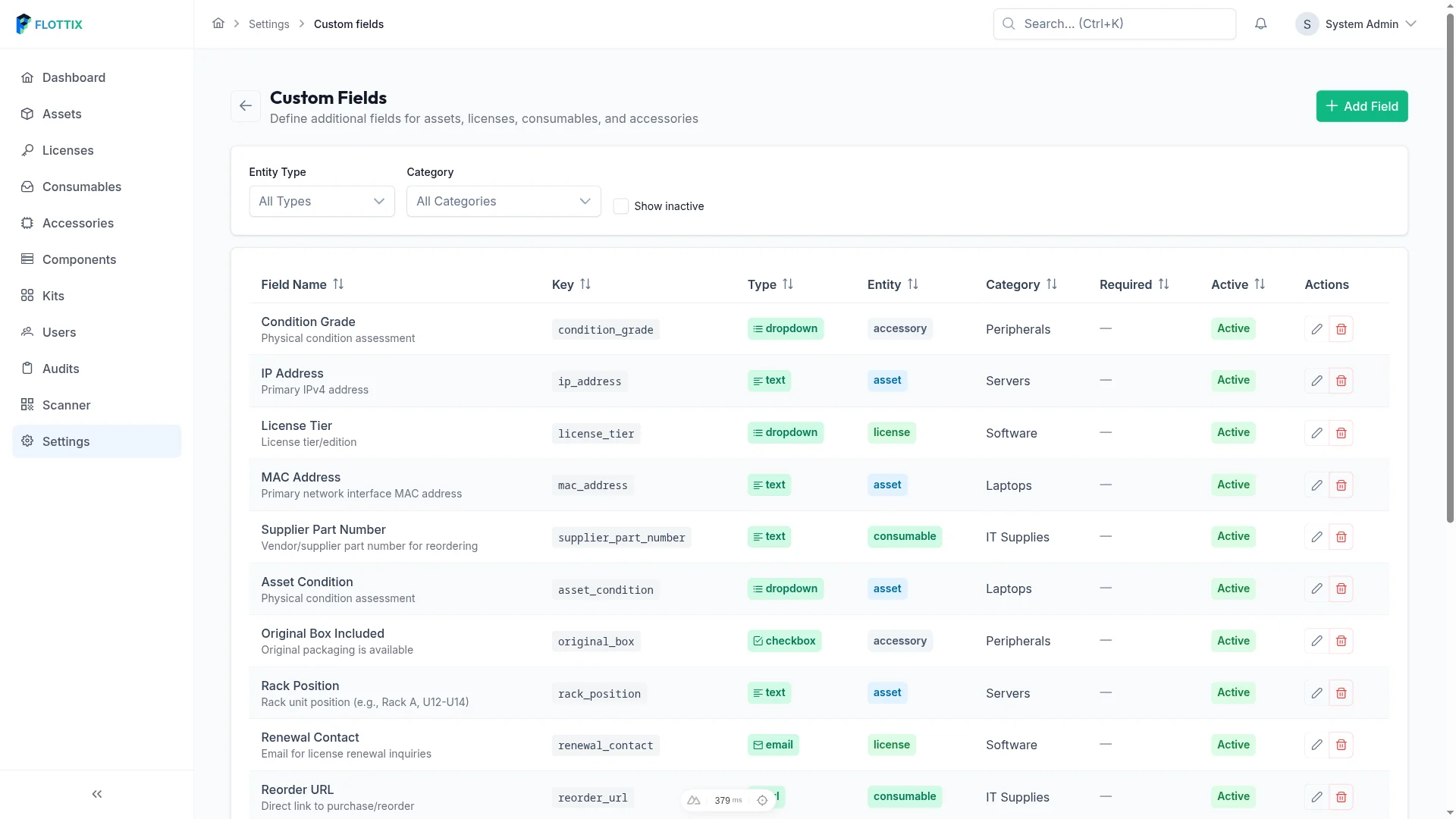
Need to track the IMEI for a fleet of mobile phones? Create a field for it. Need to log the MAC address of every network printer? Done. You can define field types (Text, List, Date, Checkbox) to ensure your data stays clean and standardized across your entire team.
Field Sets: Organized Complexity
We know that having 50 custom fields can get messy. You don’t want to see “Battery Cycle Count” on a desktop server or “SIM Card Number” on a monitor.

In v0.10, you can group your fields into Field Sets. You can create a “Mobile Device” set and a “Server Hardware” set. When you create or edit an asset, Flottix only shows you the fields that are relevant to that category. It keeps your interface clean and your data entry focused.
Powerful Filtering and Reporting
The real magic happens when you need to find something specific. Because these aren’t just “notes,” every custom field is a first-class citizen in our search and filter engine.

If you need a report of every laptop with a “Purchase Reason: Project Alpha” or every server with “RAID Level: 10,” you can generate that list in seconds. It transforms Flottix from a generic inventory tool into a specialized database tailored to your exact industry.
The Managed Advantage: Schema without the Stress
On a self-hosted platform, adding custom fields often involves database migrations or heavy PHP processing that can slow down your site as your inventory grows. I’ve seen self-hosted instances crawl to a halt after adding too many custom attributes.
Because Flottix is a Fully Managed Platform, we built our custom field engine on a modern, elastic architecture. Whether you have 10 custom fields or 100, and whether you have 500 assets or 50,000, your dashboard remains lightning-fast. We handle the indexing and the database scaling in the background so you can focus on the data.
Your Inventory, Your Way
Version 0.10 is the final major piece of the puzzle before our official brand launch. It represents our commitment to flexibility without sacrificing the “3-Second Rule” for speed.
Ready to build the perfect inventory for your team?